DeckHand for CyberDeck
The operator surface for productions that run CyberDeck. Your tech lead publishes a role: the exact buttons and variables your job needs, and nothing else. You scan a QR code and run the show.
- Price
- $4.99, one-time
- Runs on
- iPad, iPadOS 17 or later
- Network
- LAN only, no accounts
DeckHand needs CyberDeck. It pairs with a tech lead running CyberDeck (Pro) on their own device. On its own it does nothing. If your production doesn't run CyberDeck yet, start there.

How it works
Your tech lead builds a role
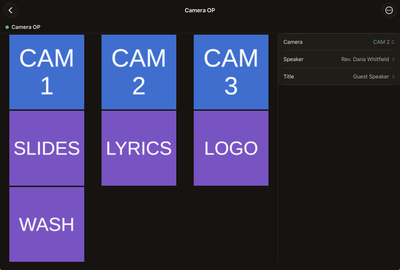
In CyberDeck (Pro): the buttons and variables your job needs, and nothing else.
They show you a QR code
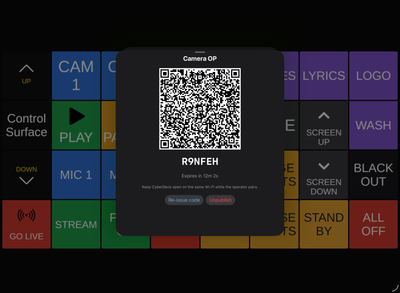
Scan it with DeckHand, or type the 6-character code. Pairing runs over the venue's own local network; no account, no sign-in.
You run the show
Press buttons live, edit variables mid-show, and stay inside the boundaries your tech lead set.
What you get
Just your buttons. A focused grid of what your tech lead exposed, with live button state straight from Companion.
Safe variable edits. Toggles, pickers, text and numbers, with validation so a typo can't take down the show.
Always in sync. Pull to refresh, or just reopen the app; your surface updates when your tech lead publishes changes.
Plain answers. When something's off, DeckHand names it: wrong Companion version, an API turned off, or a role revoked.
Before you start
- A tech lead running CyberDeck (Pro) 2.3 or newer on their own device. Pairing was added in 2.3; older builds can't publish a role.
- Bitfocus Companion 4.3+ on the production's control computer.
- In Companion's Protocols settings: the Button Subscriptions API and the HTTP API both enabled.
- An iPad, iPadOS 17 or later. An iPhone build is planned for 1.1; the Android operator app is planned and unwritten.
Importing a Companion config silently turns the Button Subscriptions API back off. If DeckHand says subscriptions are unavailable, have your tech lead re-check that setting.
For tech leads
Publishing roles is a CyberDeck (Pro) feature, and it lives on your device, not the operator's. Build a role, choose which buttons and variables it exposes, and publish it. The sheet gives you a QR code and a 6-character code; the operator uses whichever the room allows.
Once they're paired you can see who's connected, push an updated role when the show changes, and revoke a pairing when it's over. Nothing you didn't expose is reachable from the operator's iPad.
Support
Questions? The help page covers DeckHand too, or email dh-support@cyberdeckapp.com.